Get Tom's Hardware's best news and in-depth reviews, straight to your inbox.
When you purchase through links on our site, we may earn an affiliate commission. Here’s how it works .
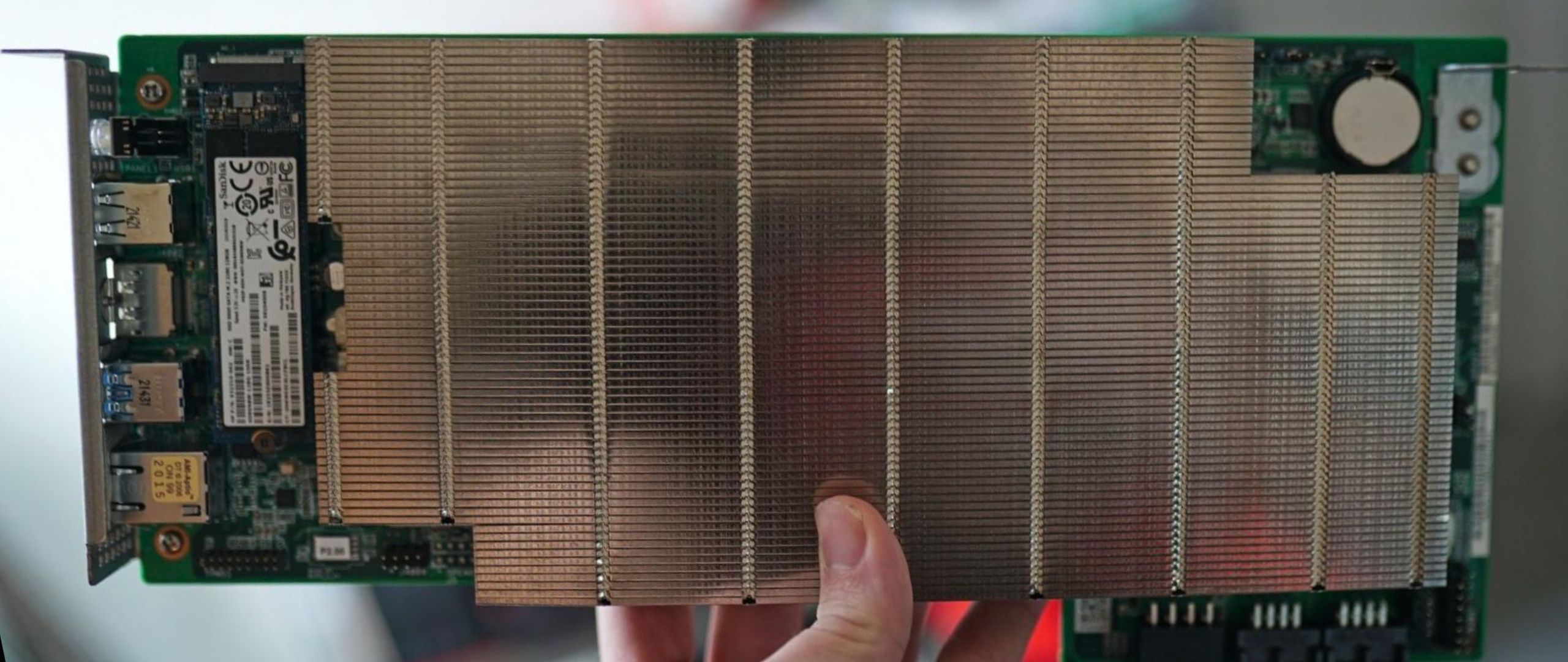
The AMD BC-250 has taken on a new life. It’s a PS5 APU that was repurposed for mining during the crypto boom, and now it’s being repurposed once again as a Linux gaming board. The BC-250 has seen some coverage in years past. It was originally a board you could pick up for less than $100, but now you’ll likely spend over $200 on one. We’re taking a closer look at the board and the performance it offers now for a few key reasons.
First, we have the Steam Machine . Valve ’s long-awaited console-like PC is here and much more expensive than anyone expected at over $1,000. You can easily put together a BC-250 build for around $400 or $500, and even less if you have a power supply and SSD lying around. If you can get in the realm of Steam Machine performance for half the price (and the BC-250 can, based on our testing), that’s pretty compelling.
There have also been some significant developments among the BC-250 community. The board only works in the first place due to a community-developed BIOS and GPU driver, and developers have continued to experiment with what’s possible with the hardware. Now, there are tools that enable all 40 Compute Units (CUs) on the board (it defaults to 24 CUs), as well as tools to enable the two disabled Zen 2 cores, taking the six-core CPU to an eight-core CPU.
Now, the BC-250 isn’t a cut-down PS5 APU, at least from a hardware perspective. It actually patches two more graphics CUs compared to the PS5. Though, as should become clear throughout this story, relating the BC-250 to the PS5 on anything but the silicon on the board isn’t the best idea.
All in, we spent about $350 on the BC-250, with around $200 of that going toward the board (it’s currently listed for around $175 on eBay) and the additional budget going toward a 3D-printed case, fans, and a power supply. You could spend as little as the cost of the board if you can 3D print a case, bring your own fans, and repurpose an old PSU and NVMe SSD. If you’re starting from scratch, you’ll spend between $400 and $500.
Even for “full” price, the BC-250 is significantly cheaper than what you can get elsewhere. The PS5 digital edition is now $600 , while the Pro will run you $900. The newly-released Steam Machine starts at $1,050, and that’s with just 512 GB of storage. The BC-250 is significantly cheaper and offers performance that can rival these platforms. What you save in money, however, you spend in time.
The BC-250 is a great project if you like tinkering, but it’s not a set-it-and-forget-it gaming device, even after the initial setup. After a few weeks of using the board, that much became clear.
The BC-250 is described as a cut-down PS5 APU, and that’s exactly what it is, but the “cut-down” portion of the description carries a lot of weight. It comes with eight Zen 2 cores, but two of them are disabled, and a 40-CU RDNA 2 GPU, though only 24 of those CUs work out of the box.
The community has been able to unlock all 40 CUs with good success. Ultimately, your mileage with unlocking all 40 CUs will vary; some boards will work just fine with all 40, others with 32 or 36, and some with the base 24. As I’ll dig into more later, I was able to unlock all 40 CUs and run them stably up to 1,850 MHz, much higher than the recommended 1,500 MHz max frequency.
Out of the box, both the CPU and GPU run at locked frequencies of around 3.5 GHz and 1,500 MHz, respectively. You’ll need to separately install a GPU and CPU governor for dynamic frequency scaling (a necessity in the case of the GPU, though optional for the CPU). Achievable frequency on the CPU and GPU is entirely determined by your thermals. Both governors allow for overclocking, but the BC-250 is thermally constrained, even with active airflow, so don’t expect to push far beyond the stock frequency, particularly on the CPU.
Unfortunately, storage is a big bottleneck for the BC-250, and one of the biggest points of divergence compared to a PS5. The M.2 runs at just PCIe 2.0 x2 speeds, delivering about 1 GB/s of maximum performance with an NVMe SSD. The good news is that, due to how slow the interface is, you can save some money and get a less-performant but larger drive for storage.
As of a few days ago, at the time of writing, some initial fixes to unlock the extra two CPU cores have rolled out, which I was able to get working after a bit of trial and error. Outside of the GPU and CPU, the BC-250 has a bit less L3 cache. The APU, from a hardware perspective, is very similar to the PS5. Though that ignores the complex I/O system present in the PS5, not to mention the various layers of software that Sony runs on the APU.
Given that the BC-250 wasn’t designed for gaming, it’s important to keep that context in mind. You could just as easily describe it as a crypto mining board that’s been repurposed for gaming as you could a PS5 APU that’s been repurposed for mining. The BC-250 is a mining board, and the only reason it works is due to a large number of enthusiasts trying to get the damn thing to work and sharing their advancements along the way.
Although Linux gaming broadly has made a ton of advancements over the past few years, the BC-250 has unique hurdles you need to overcome. It needs fixes to scale the frequency on both the CPU and GPU; otherwise, it’s locked at a fixed frequency. It needs a custom BIOS image to even boot, and a specific configuration in the BIOS to avoid immediately crashing. Those are all steps you need to take to get the BC-250 to work in the first place, let alone start optimizing it to squeeze out the best performance.
There is extensive community documentation for the BC-250 , which I referenced ad nauseam throughout this process. It’s an excellent resource, but even still, I had to search out solutions outside of the documentation. This is cobbled together from community fixes, and the documentation seeks to cover as many distros as possible. But it’s nigh impossible to have complete documentation on the BC-250, as valiant as the effort linked above is.
Expect a bumpy (but rewarding) road. It’s better to think of the BC-250 as a project, rather than a commodity like the PS5. Yes, you can play games on it and get surprisingly good performance, but you’ll spend a good amount of time simply tinkering with the machine, at first to get it to work, and later to optimize it. And you will inevitably run up against games that either don’t work or have poor performance, prompting another investigation and optimization cycle. I find the process rewarding; others will find it frustrating.
Getting the BC-250 is only one part of the process here. At the least, you need a power supply that can deliver at least 20A on the 12V rail. A standard PSU will work, but FlexATX power supplies are a better fit. I ended up purchasing a 3D-printed case, along with a power supply, from eBay . The BC-250 documentation includes several PSU recommendations, along with case designs, if you want to go about choosing your parts piecemeal.
Regardless of the route you choose, double-check fan mounting points (there aren’t any mounts on the BC-250 itself) and case/PSU compatibility. Many small form factor BC-250 designs you can 3D print are designed around a FlexATX PSU. Before booting, verify your 8-pin pinout against the community documentation. If the 12V pins are in the wrong position, you can fry your board.