Dive into our proprietary testing data and compare hardware with detailed benchmarks.
Go beyond the headlines with expert reporting on the hardware industry.
In-depth features, interviews and insider stories from the world of hardware.
Get Tom's Hardware's best news and in-depth reviews, straight to your inbox.
A unique exercise in cost-no-object computing, with lots of screens, several pounds of copper, and an open case that might necessitate a desk upgrade.
When you purchase through links on our site, we may earn an affiliate commission. Here’s how it works .
In these days of expensive SSDs, high RAM prices, and gaming GPU stagnation , it’s not often that even we find a good reason to build a PC. So when Asus reached out asking if we’d be interested in building a system based around its extensive Edition 20 anniversary lineup, I instinctively said yes. Having seen most of the components at Computex 2026 earlier this summer, I knew I was going to be dealing with premium, high-end parts that would make for a striking, powerful PC.
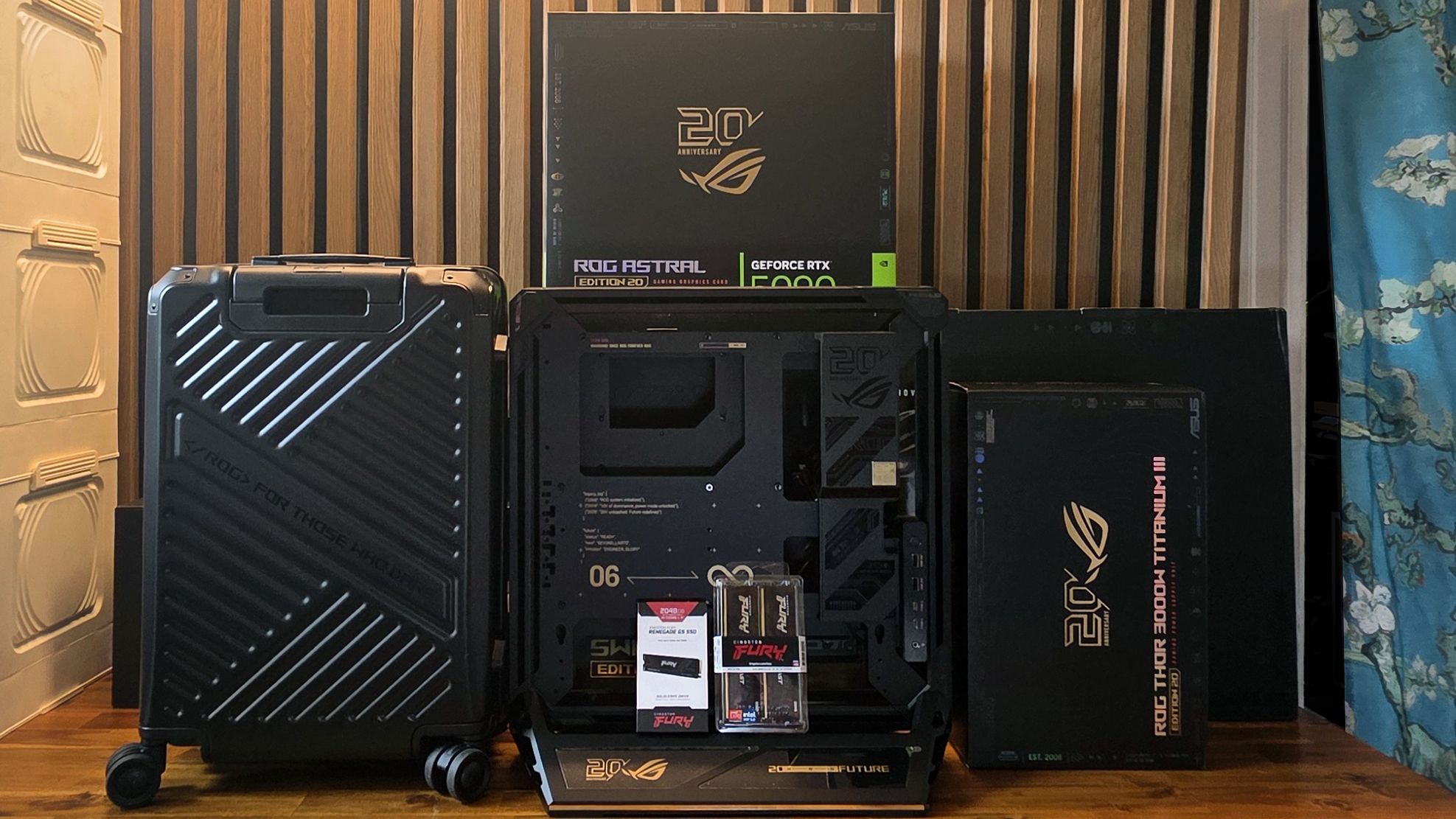
What I didn’t expect was to receive five large packages, weighing over 150 pounds, and for the motherboard and cooler to come in their own ROG suitcase (yes, that’s a thing ), or for the 3,000W PSU to sell for $899 all on its own. This was clearly going to be a unique PC building experience, but it’s certainly not for everyone. In fact, considering the high price of pretty much all of the parts here, this is a build for the select few. But that doesn’t mean the build process wasn’t interesting.
Let's just get this out of the way early on, though: Building any gaming PC right now is expensive. Building one with an RTX 5090 is prohibitively pricey. Building one with these specific parts will set you back roughly $15,000, including the matching peripherals and OLED monitor with a translucent back panel. Think of this as the PC build for Saudi princes, the Elon Musks of the world, or for those of you who, unlike me, were smart enough to use your GPU for Bitcoin mining starting sometime in 2010, and cashed out when the cryptocurrency was trading high.
So yes, this might just be about the most expensive PC you could build today – at least with consumer-focused parts and not maxing out the RAM and storage. But many of us are likely finding ways to deal with the PC hardware we have right now; let’s take a look at what piecing together a new build is like if money is no object and you want the cohesive design that comes from sourcing all (or at least most) of your components from one company.
We’ll go step-by-step through the rather unique build process of this Asus ROG Edition 20 build shortly. But first, here’s a look at the parts, their prices, and, in some cases, how much the components weigh. Because, gold accents or not, there’s a whole lot of heavy metal involved in this build.
Many of the components here are based on existing parts, with some new aesthetic accents and features, but the ROG G20 is a new open-frame chassis that supports large EATX motherboards and can be converted to stand vertically, horizontally as a testbed, and even diagonally for a striking leaning-back look.
It has a crossflow fan that mounts on the bottom to blow cool air onto the GPU, RGB light strips around the edges, and four fast USB ports (two 5Gbps Type-A and two 20 Gbps Type-C) that can be mounted near the bottom (default) or up top. It’s extremely solidly built, mostly from aluminum, and weighs 20.5 pounds. But some of the cosmetic covers, particularly around the edges, are plastic and magnetically attached. They have a tendency to move and become misaligned easily. In fact, one was stuck to a steel part, several inches from where it belonged when I first took the case out of the box.
It sells for between $650 and $730. If that sounds like a lot for a case, it is. But if you’re feeling sticker shock already, buckle up because we’re just getting started.
Asus offers a few iterations of its Crosshair X870E E-ATX flagship board. This Crosshair X870E Edition 20 variant , apart from the gold accents of the Edition 20 lineup, supports up to nine M.2 SSDs (five on the board and four via two included add-in cards), and has more USB-C ports than any board I’ve seen outside of a trade show (six, plus two 20 Gbps front-panel connectors).
It also has large copper VRM heatsinks designed to specifically thermally mesh with the bundled Ryugin 260 Edition 20 AIO cooler. The cooler has a massive curved 6.7-inch AMOLED screen (actually two of the curved screens we’ve seen on some other AIOs , stacked on top of one another). The cooler also features a massive copper heatsink bigger than my hand. It’s arguably overkill for anything AMD has put out on AM5 to date. But of course, high-end motherboards and coolers are all about overkill. And when you’re paying $3,299.99 for a motherboard and cooler combo, some level of overkill should probably be expected.
How do you top the record-setting ROG Astral 5090 ? If you’re Asus’ design team, you add a second back-connector power option so it can pull up to 800 watts, a glass backplate, and a curved OLED screen all its own. Unfortunately, since the Crosshair Edition 20 motherboard isn’t a BTF model, we can’t test the card’s performance with extra power here.
The GPU’s curved screen also requires you to run a USB cable from the back of the GPU to the motherboard for power and data, which feels a little lame given the sky-high $5,999 asking price .
Most RTX 5090 builds don’t need anywhere near this much juice, but the dual-voltage ROG Thor Titanium III 3000W Edition 20 is a PSU monster designed to deliver up to 3000W of power, specifically for the above Astral 5090 Edition 20 GPU (or, I guess, any other PC with extreme power needs). At 190 x 150 x 86 mm, it’s large, but not massive, given its power rating. It’s fully modular (naturally, for this class). And it sports its own magnetic OLED display, which can be mounted on either side, or extended via a cable to somewhere more visible in your case.
At $899, this PSU is an option you can easily skip if you aren’t looking to push the most power possible through Asus’ singular Edition 20 RTX 5090. Without a 230V power outlet, you’re going to be limited to 1600W from the Thor, anyway. You can get a good 1300W ATX 3.1 power supply for less than half this price, which would be more than enough to run an RTX 5090 system. But then, of course, you would have one less screen.